

Works alongside Microsoft Intune
Intune Third-Party Patching
Intune stays your MDM. Robopack keeps the third-party apps in it patched: Chrome, Zoom, Adobe Reader, 7-Zip and 30,000+ more. Every new version is packaged, tested on a clean virtual machine and rolled out through your pilot and broad rings, with no agent on your devices.
Ready to use your own tenant? Start a 30-day free trial
- 5.0 / 5 on G2 7 verified reviews
- Microsoft MarketplaceListed for Microsoft Intune
- ISO/IEC 27001Certified · Trust Center
- Microsoft MVPsOn the Robopack team
- 30,000+ appsPackaged and tested
What is third-party patching?
Third-party patching means keeping the apps that don’t come from Microsoft up to date: browsers, PDF readers, meeting clients, archivers, runtimes, developer tools and the line-of-business software your own teams depend on. On a typical Windows device that is most of the software, and most of the patching work.
Windows and Microsoft 365 Apps are covered: Intune updates them through update rings, and Windows Autopatch can run that for you. Third-party apps are the part Intune leaves to you. Each new version has to be noticed, packaged, tested and assigned before it reaches a single device.
What Intune does on its own, and where Robopack takes over
There are three ways to keep third-party apps current in Intune today: do it yourself, use Microsoft’s Enterprise App Management, or add a patching tool. Here is what each one covers.
| Job to be done | Intune on its own | Intune with Enterprise App Management | Intune with Robopack |
|---|---|---|---|
| Windows and Microsoft 365 updates | Update rings and Windows Autopatch | Unchanged | Unchanged. Robopack leaves them to Intune |
| Which third-party apps | Any app you package yourself | The apps in Microsoft’s curated catalog: hundreds, not thousands | 30,000+ apps from Roborepo, Robopack’s own app repository, and the Microsoft Store, plus any installer you upload |
| Noticing a new version | You watch the vendors | Automatic for catalog apps | New versions enter your patch flow on their own |
| Package, detection rules and testing | You build and test every version | Prepared by Microsoft for catalog apps | Built for every version in PSAppDeployToolkit, then installed and removed on a clean virtual machine, with a PDF report |
| Staged rollout | Manual: separate groups and assignments per app | No rings. Every targeted device updates at once | Pilot ring, then broad ring, moving on only when your response and success goals are met |
| Approval before devices update | You assign each version yourself | No approval step | Automatic once the pilot ring passes, or after your approval |
| An earlier version to fall back to | Whatever you kept | No rollback | Superseded versions kept in Intune, three by default |
| Apps installed outside Intune | Discovered apps: a list of names and versions | Unchanged | Radar turns that list into an inventory you can put into a patch flow |
Already have Microsoft 365 E5? Enterprise App Management is being added to it. Robopack can patch everything outside its catalog, with rings for all of it. Just let only one of them manage each app.
How third-party patching works with Robopack
Connect your tenant
A Microsoft sign-in and a consent prompt. No agent on your devices and nothing on-premises. Radar reads what Intune already knows and lists every app on every device.
Choose what to patch
Pick apps from the catalog or straight from the Radar scan, or upload your own installer and Robopack packages it as IntuneWin, MSIX or App-V.
Set the rollout once
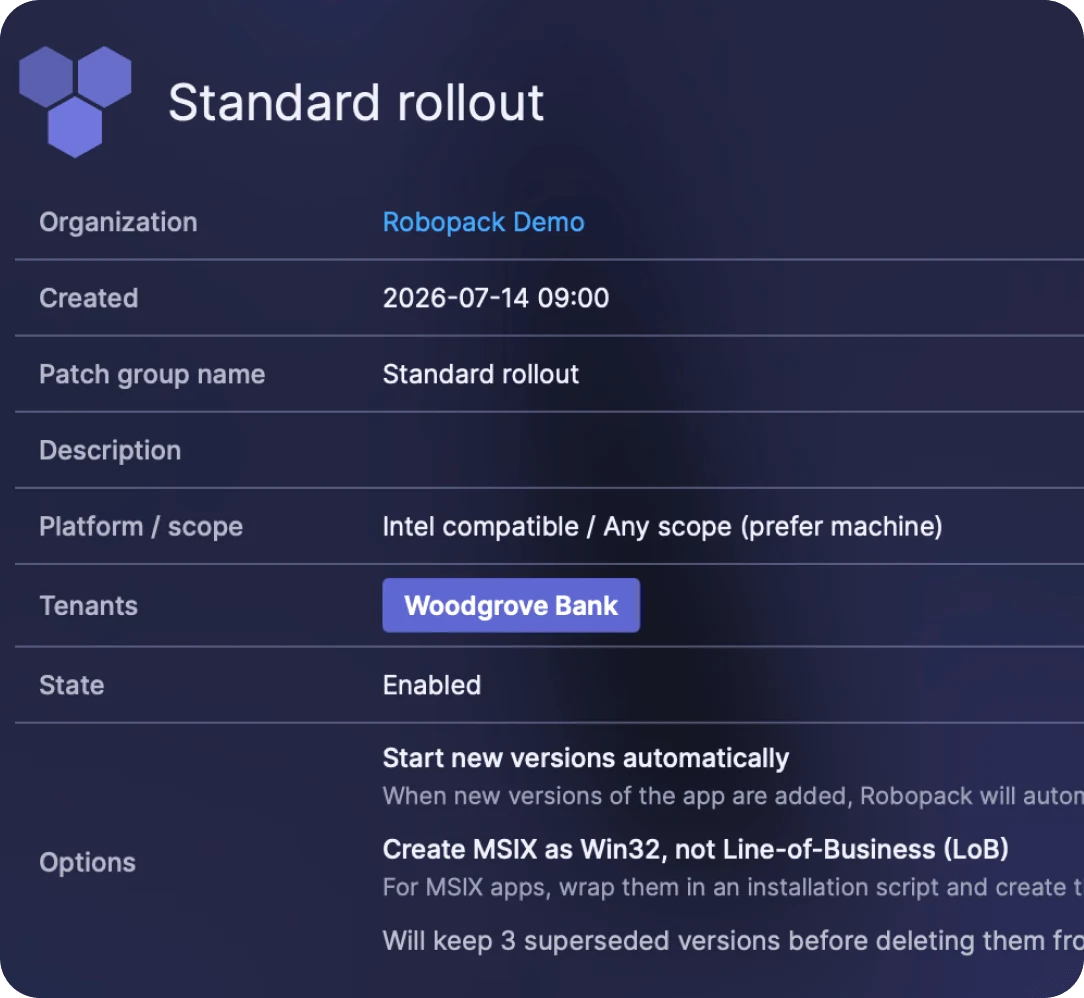
A patch group holds the policy: pilot ring first, broad ring after, the goals a release has to meet in between, and how many old versions to keep.
Let new versions roll out
When a vendor ships an update, Robopack builds and tests the new package and publishes it to Intune as a Win32 app that supersedes the old one. You watch each wave move.
Security fixes without the to-do list
Most security fixes for third-party apps ship as an ordinary new version. When nobody has time to package it, the vulnerable version stays on every device until someone does.
With Start new versions automatically switched on, Robopack sends each new version to your pilot ring as soon as it has passed testing. A new vendor version usually reaches the Robopack catalog within four hours of its release. How fast a fix reaches your devices is then set by your rings, not by somebody’s to-do list.
Ready in seconds · No login · No tenant
See it work before you connect a tenant
The sandbox is a populated demo tenant. Search the catalog, patch Chrome and watch a rollout wave go from pilot to broad ring, without connecting anything of your own.
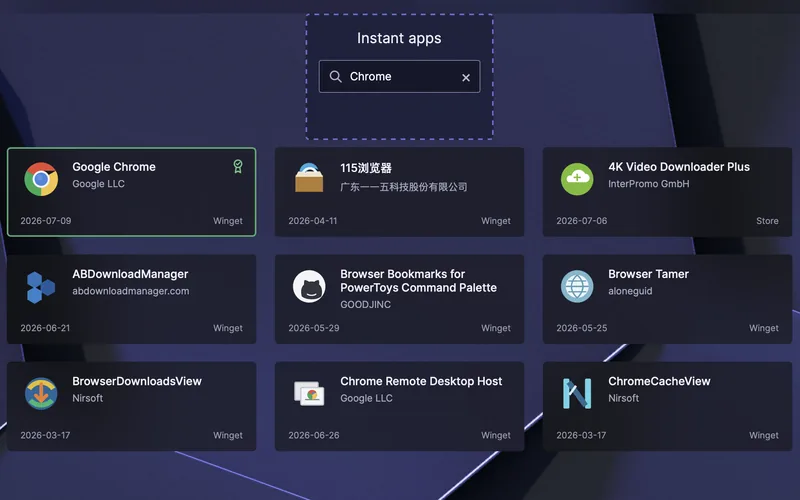
Browse the app catalog
Search a pre-loaded catalog and open any app to see its packages and versions.
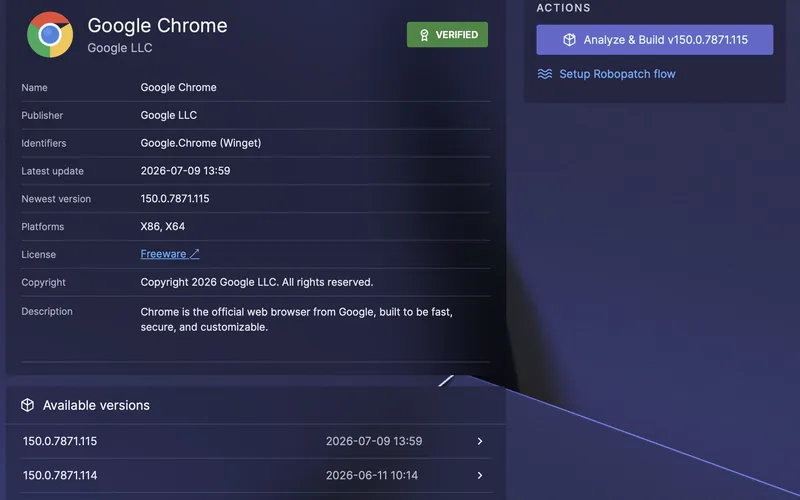
Patch Chrome and push a rollout wave
Take a new version from pilot to broad ring and watch each wave move.
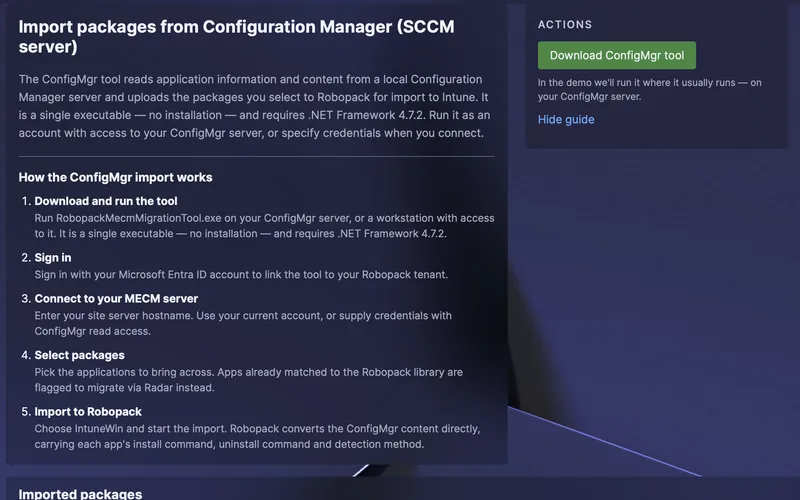
Walk the ConfigMgr-to-Intune tour
See how apps move from ConfigMgr into Intune without repackaging by hand.
Want it on your own apps instead? Start a 30-day free trial
What Intune admins say on G2
5 out of 5 stars
Robopack saves time where Microsoft Intune Admins need it most!
“…it combines automated application packaging, third-party patch management, and a massive application catalog into a single Intune-focused platform…”
Nicky D.Modern Workplace ConsultantMid-Market (51–1,000 emp.)
5 out of 5 stars
Effortless App Management with Robopack
“Compared to PatchMyPC, the number of ready-to-deploy applications and app flow make Robopack a lot better and I definitely recommend it. The ROI is huge on Robopack!”
Przemek M.IT SpecialistEnterprise (> 1,000 emp.)
5 out of 5 stars
Robopack Makes Intune App Packaging and Updates Effortless
“It takes a time-consuming part of endpoint management and makes it much easier to manage, freeing up time to focus on other work.”
Vince T.Lead EUC ConsultantMid-Market (51–1,000 emp.)
Rated 5.0 / 5 from 7 verified reviews. Read them all on G2 ↗
Intune third-party patching questions
What is third-party patching in Intune?
Keeping the apps that don’t come from Microsoft up to date on the devices Intune manages: browsers, PDF readers, meeting clients, archivers, runtimes and your own line-of-business software. Intune can deliver those apps, but it doesn’t notice new versions or build them. Each update has to be packaged, tested and assigned before it reaches a device. A third-party patching tool such as Robopack does that work and publishes the result through Intune.
Can Intune automatically update apps?
Partly. Microsoft Store apps keep themselves up to date, and since June 2026 apps from Microsoft’s Enterprise App Management catalog can update automatically when they are assigned as required. Win32 apps you package yourself don’t update: every new version is a new package, new detection rules and a new assignment. Robopack automates that for 30,000+ catalog apps and for the installers you upload.
Can you use Intune for patching?
Yes, for Windows and Microsoft 365 Apps: update rings, feature and quality update policies and Windows Autopatch take care of them. For third-party apps, Intune is the delivery channel rather than the patching process. It installs what you give it, so somebody still has to build and assign every new version. Robopack does that part and delivers through Intune.
Does Microsoft have a patch management tool?
For its own software, yes: Windows Update for Business and Windows Autopatch cover Windows, Microsoft 365 Apps, Edge and Teams, managed from Intune. For other vendors’ apps, Microsoft offers Enterprise App Management, an Intune add-on that is also being added to Microsoft 365 E5. It covers the apps in Microsoft’s catalog and has no rollout rings, so an update goes to every targeted device at once.
Is Enterprise App Management enough on its own?
It can be, if every app you need is in its catalog and you are happy for updates to reach all targeted devices at once. Most estates also run apps that no catalog has, such as engineering tools, vendor utilities and line-of-business software, and most teams want a pilot ring before a broad rollout. Robopack covers both. If you use both, manage each app with only one of them: two update mechanisms on the same app make its version flip back and forth.
Where do the apps in the Robopack catalog come from?
From Roborepo, Robopack’s own app repository, and the Microsoft Store. Robopack packages and maintains every Roborepo app itself, and every app goes through Robopack’s 26-stage testing process before release. A new vendor version usually reaches the catalog within four hours.
Do we need an agent or a server?
No. Robopack is a cloud service that publishes into your Intune tenant. Devices install through the Intune Management Extension they already run, and there is nothing to install on-premises.
What if a new version breaks something?
It reaches your pilot ring first and only moves on when the response and success goals you set are met. You can also require an approval before a wave continues. Robopack keeps superseded versions in Intune, three by default, so there is always an earlier version to assign.
Can an MSP patch several customer tenants?
Yes. Connect each customer tenant, give your engineers Read, Write or Config rights per tenant, and run one patch flow across the tenants that should follow the same policy.
Where is our data hosted?
Robopack is a Danish company, customer data is hosted in the EU, and Robopack is certified to ISO/IEC 27001:2022. The details are in the Trust Center.

Patch a third-party app in a demo tenant
Open the sandbox and push a rollout wave in under a minute. Want to see Radar, patch groups and custom packaging first? Take the full Intune patch management tour.
Or run it against your own Intune tenant with a 30-day free trial.