

A new colleague opens their Windows laptop, finds the approved software catalogue and installs the apps they need. Another colleague joins the same team with a Mac and raises a ticket for those same tools. Someone in IT checks the request, finds an installer and works out how to deliver it. The request gets resolved. A week later, someone else asks again.
If that sounds familiar, it is worth looking at which macOS apps deserve a repeatable delivery process. A useful starting point is to identify the software people regularly need, understand what happens when it is unavailable, and make those apps consistently accessible to the right users.
The aim is a dependable experience on both platforms. People should know what software is supported, how to get it and where to go when they need help.
When a request becomes a recurring service
In an organisation with a long history of supporting Windows, the app catalogue often reflects years of accumulated work. Common requests have become standard packages, approvals are understood, and ownership is established. A smaller Mac estate may have grown through individual requests, with each one handled successfully but little opportunity to turn the solution into a routine service.
That does not describe every environment. Teams with established macOS management practices may already offer a mature app experience. But where the gap exists, it tends to show up in the same ways, and the effects are easy to recognise: employees wait for familiar tools, the service desk repeats the same checks, and useful knowledge stays with the person who handled the last request.
A recurring software request is a reason to review the process. If the app, audience and approval conditions are broadly the same each time it arrives, there is a reasonable case for making at least part of that process routine.
Start with evidence of demand
Look at recent software requests, onboarding checklists and the apps already in use across your Mac estate. Choose a manageable period, such as the last three months, and group requests by application. Include requests that arrive through informal channels where you can; the ticket queue may only tell part of the story.
Count the people and teams asking for each app, as well as the tickets. Ten requests from different employees suggest something different from ten follow-ups on one unresolved installation. Ask team leads which tools new starters routinely need and whether upcoming projects will change that demand.
Pay attention to requests that never arrive, too. An employee may already have found a workaround or assumed that an app is unsupported. A short conversation with Mac users can reveal needs that a service desk report misses.
Use your Windows catalogue as a reference point for business needs. For each application, check whether Mac users need the same application, an appropriate macOS alternative or access through a browser. The resulting catalogue should reflect how people actually work on their Macs.
Weigh business importance alongside request volume
Popularity alone is an incomplete basis for setting priorities. A widely requested convenience app may create less disruption when unavailable than a specialist tool used by a small team to deliver client work.
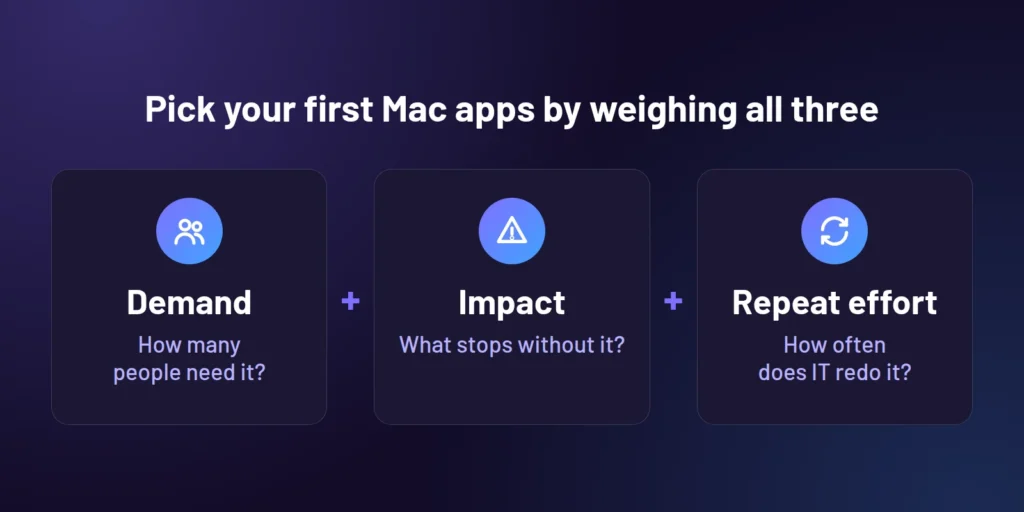
For each candidate, ask what stops if the app is missing. Can the employee continue with an approved alternative, or does the delay affect a customer commitment or prevent someone from doing their core role? Work out who can confirm that business need, then consider how often IT repeats the same work. An app requested during every onboarding cycle is a strong candidate for consistent delivery, even if the Mac population is small. So is an app that repeatedly requires the same installation guidance or approval checks.
Take a simple example. A collaboration app requested by several departments is a likely candidate for broad availability. A design tool used by a small production team may deserve equal attention because their work depends on it, with access limited to that team. An occasional utility with an approved alternative may remain a request handled individually.
Demand shows how widely an app is needed. Business importance explains the consequence of waiting. Repeat requests reveal where a standard process could remove recurring effort. Consider those factors together when choosing what to tackle first.
Define what consistently available means
Adding an app to a list is only the beginning. Before anything reaches a device, decide who should receive it, whether installation should be automatic or available on request, and whether a licence or approval is required. Make those conditions clear to employees and the service desk.
Give each app an owner who can answer practical questions about support and maintenance. Agree how updates will be tested, who will respond to installation failures, and what happens when a version or application is retired. An app that installs successfully today still needs attention as requirements change.
Validate the delivery process with representative Macs and users before expanding it. Include any permissions, configuration and sign-in steps needed to make the app usable. From the employee’s perspective, delivery is only complete when they can do their work with the software.
Build on your existing macOS expertise
If your organisation uses Jamf or works with macOS specialists, involve those teams when setting priorities and defining support. They can help identify which requests can become routine and which applications need more individual care.
Improving app availability can sit within your existing management approach. Keep established responsibilities for device configuration, security and specialist support clear. Discuss where app preparation and maintenance create repeated effort, and address those gaps within the workflows your team already trusts.
Some applications will continue to need specialist handling because of their configuration, licensing or business dependencies. Make the route for those requests visible, with a named owner and a clear, realistic expectation of what happens next.
Start small and review the result
Choose a small initial set of apps where the need is clear and ownership is agreed. Record how users currently obtain them, how long fulfilment takes and which steps repeatedly need IT involvement. That gives you a useful baseline for judging whether the new approach helps.
After rollout, review installation issues and ask employees whether the software was easy to find and use. Check whether repeat tickets have fallen and whether maintenance is manageable for the team. Use those findings to decide which apps to add next, and remove entries that are no longer needed.
A dependable macOS catalogue grows from those decisions. Start with the apps your people rely on, make access predictable and give maintenance a clear owner. That is also the context for what we are working on at Robopack: macOS support is coming soon, with a private preview currently in progress. We’ll be announcing an official release date in due course, but you can sign up for exclusive updates and key information about the release by clicking here and joining our inner circle.
Leave a comment